Shared credits and spend limits
Understand whose credits pay for work done inside a SonicVox workspace, what caps a member's spending, and how to set and read those caps.
Who pays
Every generation resolves to one paying account before the work starts. The plan that gates the request and the balance that is charged are always the same account.
| Where you are working | Whose plan gates the work | Whose balance is charged |
|---|---|---|
| Your own personal workspace | Yours | Yours |
| A workspace you own | Yours | Yours |
| A workspace you do not own, owner on a paid plan | The owner's | The owner's |
| A workspace you do not own, owner on the Free plan | Yours | Yours |
That third row is the whole point of a seat: in a paid workspace, what a member generates is billed to the owner's balance and entitled by the owner's plan. This is called pooled billing.
A Free workspace pools nothing. Its members keep spending their own credits, exactly as they would working alone.
Two more cases resolve to you paying for yourself:
- You have been invited but have not accepted yet, or your membership is suspended. Only a live member can draw on the pool.
- The request carries no active workspace at all. Pooling requires a positive signal — the workspace you switched to, or the workspace a queued job recorded when you submitted it — never a guess about which team you probably meant.
The workspace selected in the switcher when you press Generate is the one that pays. A job that runs in the background records that workspace at the moment you submit it, so switching afterwards does not move the charge.
The balance you see is the balance you spend
When you are working in a paid workspace you do not own, the credit balance, plan name and reset date shown in the app are the workspace owner's, not your personal ones. That is deliberate: the number on screen has to be the number your next generation will draw from, or you would be told you had no credits for work the workspace is paying for.
Switch back to your own workspace and the display returns to your own balance.
The three ceilings
Pooling is bounded. Before a member is allowed to spend the owner's credits, up to three ceilings are checked, and the tightest one wins.
| Ceiling | Applies to | Set where | Measured against |
|---|---|---|---|
| Basic seat cap — 50,000 credits per cycle | Anyone on a Basic seat | Fixed; change it by moving the person to a Full seat | That person's own draw from this workspace this cycle |
| Per-member limit | One named member | Members tab, on their row | That person's own draw from this workspace this cycle |
| Billing-group budget | Every member of that group | Groups tab, on a group marked as a billing group | The whole group's draw from this workspace this cycle |
A Full seat has no ceiling of its own — it is bounded only by the workspace balance. Your plan includes a fixed number of Full seats (1 on Free, Starter and Creator; 3 on Pro and Scale; 10 on Business; 11 as the starting point on Enterprise, where seat counts are agreed per contract), and the owner always occupies one of them. When they are all in use, promoting someone to a Full seat is refused until you free one or upgrade.
Three things are worth knowing about how the ceilings behave:
- A ceiling never grants anything. It only subtracts. Nobody can spend past the workspace balance because a limit says they may.
- Only work done in this workspace counts. Spending in another workspace, or in your personal one, does not consume the allowance here.
- A job that costs more than your remaining allowance is refused outright, not run partially. Ask for a shorter job, or wait for the cycle to reset.
A billing-group budget is shared, not per person. A group of five with a 60,000-credit budget has 60,000 credits between them for the cycle — one member can consume all of it and the rest are then blocked. If a member belongs to several billing groups, the tightest of those budgets applies.
What a member sees at a ceiling
The refusal names the ceiling that stopped them, so they know who to ask and what to ask for.
| Ceiling reached | Message |
|---|---|
| Basic seat cap | Your Basic seat's monthly allowance of 50,000 credits is used up. Ask a workspace admin for a Full seat, or wait for the next billing cycle. |
| Per-member limit | You have reached the credit limit a workspace admin set for you this billing cycle. |
| Billing-group budget | Your billing group has reached its credit limit for this billing cycle. |
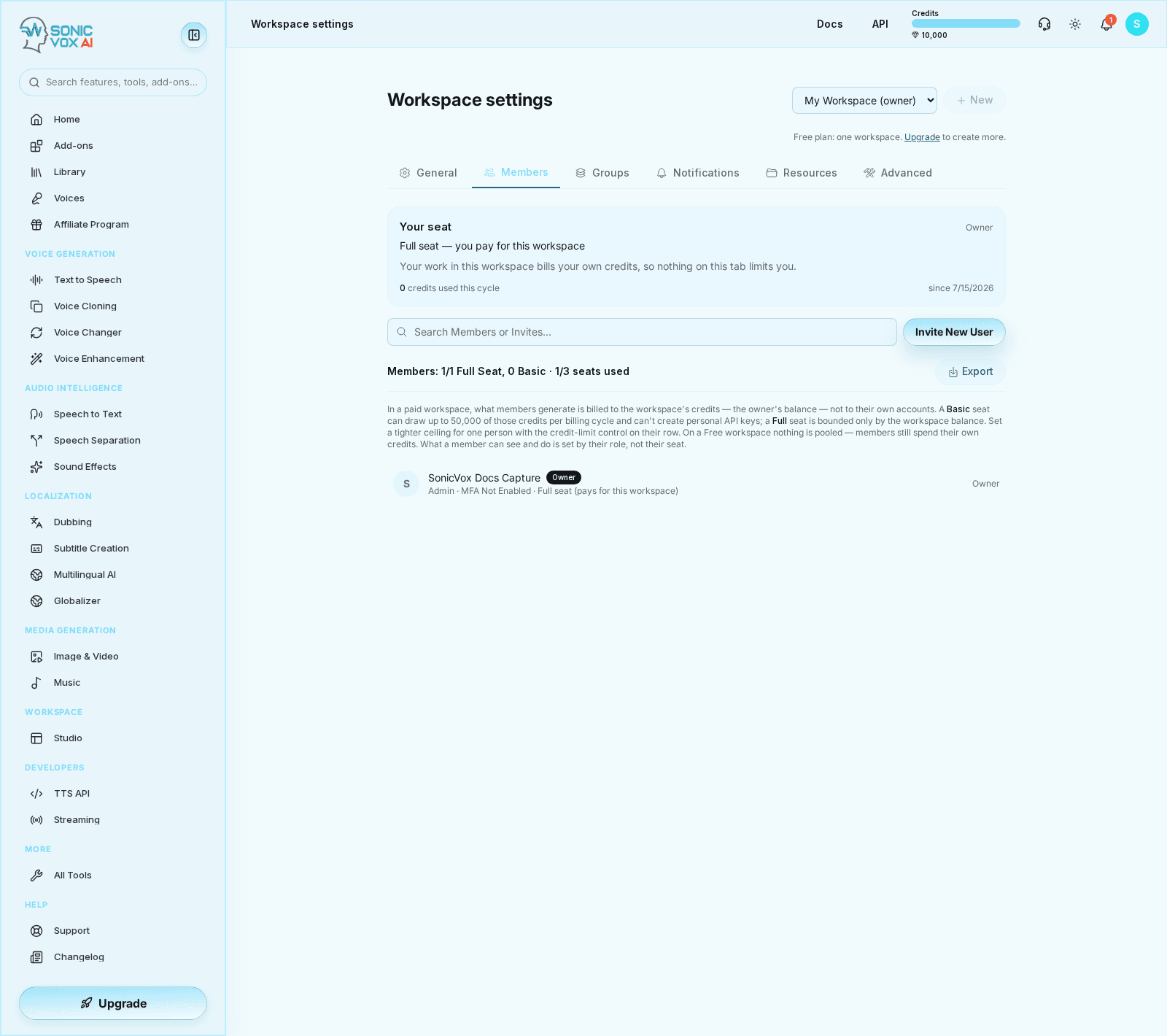
To see this coming rather than discover it mid-job, open Settings → Team → Members. The Your seat card at the top of that tab states your seat, the ceiling that binds you and why, and how much of it you have used this cycle, with the date the cycle started.
Set a limit for one member
Owners and admins can cap what one person draws from the pool.
!Workspace settings, Members tab, showing the Your seat card and the per-member credit-limit control

- Open the Members tab
Go to /app/settings/team and select Members. Pick the workspace you are administering in the switcher at the top right.
- Open the credit-limit control on their row
Each member row carries a button reading No credit limit or the limit already in force, next to the role and seat selectors. Only owners and admins see it.
- Enter a number of credits per cycle
Whole numbers only, from 0 up to 1,000,000,000. 0 is a real setting — it stops that member spending workspace credits until the cycle resets. Leaving the field blank clears the limit.
- Save
The limit takes effect on their next request. Their seat still applies underneath it: a Basic seat stays capped at 50,000 regardless of a higher per-member number.
You cannot set a limit on the workspace owner. The owner is the payer, their work is never pooled, and a ceiling stored on them would bind nobody while looking like a live control.
Set a shared budget for a group
- Open the Groups tab
Create the group and add its members first. The built-in Everyone group cannot carry a budget — its roster is virtual, so a limit on it would apply to no one and the product refuses to store one. Use a group with an explicit roster.
- Mark the group as a billing group
Use the card icon on the group's row. Only a billing group's budget is enforced.
- Set the limit
Open the group and choose Set limit. Same range as a per-member limit: 0 to 1,000,000,000 credits per cycle, blank for none.
Turning off the billing-group flag clears the budget. The app confirms this first. It is cleared rather than kept so that re-flagging the group later starts from "no limit" instead of silently re-arming a number nobody remembers setting.
Read what people have spent
| What you want | Where it is |
|---|---|
| Your own consumption and ceiling | The Your seat card, Members tab |
| Everyone's consumption | The Export button on the Members tab. The CSV has a credit_limit column and a credits_used_cycle column per member |
| A group's remaining budget | Not shown on screen. Sum the credits_used_cycle values of that group's members from the same CSV |
The member rows themselves show role, seat and limit — not consumption. The CSV is the per-person spend report.
Which cycle the numbers cover
Every figure on this page — allowances, consumption, group budgets — is measured over the workspace owner's current billing cycle, not the calendar month and not your own subscription's dates.
The cycle starts one month before the owner's next credit reset. When the owner has no reset date recorded, it falls back to the first of the current calendar month (UTC). The Members tab prints the resulting start date next to your consumption as since <date>, so you can always see the window a number is being measured over.
Allowances refill when the owner's cycle rolls over. Nothing carries forward.
Refunds
A refund returns credits to the account that was charged. For pooled work that is the workspace owner, even when the member who did the work requested it, has since left the workspace, or has been suspended. A refund reverses the transfer that happened; it does not re-decide who would pay today.
Refunded credits also stop consuming the member's allowance and the group's budget — both are computed from charges minus reversals, so a failed generation does not eat someone's budget for the rest of the cycle.
When the pool runs out
Ceilings are checked first, then the balance. If the workspace balance cannot cover the job, what happens next depends on the owner's billing settings, not the member's: an owner who has enabled overage on a plan that offers it can let generation continue on account within their overage cap, and an owner who has not gets the ordinary insufficient-credits refusal. Accounts whose billing has lapsed cannot open new overage at all.
Alerts on workspace spending
Settings → Team → Notifications carries a row called Owner credit usage threshold. Turn it on, choose percentage or absolute, and set a number; it starts at 80 percent.
When the threshold is crossed, everyone holding the owner or admin role on the Members tab gets one email, once per cycle per alert type. Usage is evaluated once a day.
The figure it measures is how much of the owner's monthly subscription grant has been drawn down this cycle. Purchased top-up credits are excluded from both sides of the ratio, so buying credits does not make the alert go quiet. Because pooled member work debits the owner's balance, member spending is inside that number. The email also states the total credits attributed to the workspace this cycle across everyone in it.
A worked example
Northwind is owned by Priya on a paid plan. Her next credit reset is 5 September, so the current cycle began 5 August. The workspace balance today is 120,000 credits.
| Member | Seat | Per-member limit | Billing group | Drawn this cycle |
|---|---|---|---|---|
| Dana | Basic | none | none | 47,500 |
| Raj | Full | 20,000 | Season 4 (60,000 shared) | 8,000 |
| Mia | Full | none | Season 4 | 46,000 |
- Dana is bounded by the Basic seat cap alone: 50,000 − 47,500 = 2,500 left. A 2,000-credit job runs. A 3,000-credit job is refused with the Basic-seat message, and raising her to a Full seat — if Priya's plan has one spare — removes that ceiling.
- Raj has two ceilings. His own limit leaves 20,000 − 8,000 = 12,000. Season 4 has drawn 8,000 + 46,000 = 54,000 of its 60,000, leaving 6,000. The tightest wins, so Raj has 6,000 left and a 7,000-credit job is refused with the billing-group message.
- Mia has no seat cap and no personal limit, so Season 4's remaining 6,000 is her ceiling too. It is the same 6,000, not 6,000 each. If Raj spends 5,000 first, Mia has 1,000 left.
Every one of those credits comes out of Priya's 120,000. After Dana's 2,000 and Raj's 5,000, the workspace balance is 113,000. If Raj's job then fails and is refunded, the 5,000 goes back to Priya's balance, and Raj's allowance and Season 4's budget both recover the same 5,000.
One honesty note on the arithmetic: allowances are checked immediately before a charge, so two jobs a member starts at the same instant can both pass the check and overshoot that person's allowance slightly. The workspace balance itself is guarded at write time and can never be overdrawn — the drift is limited to one member's share, by at most one in-flight job.