DocsCore Features

Music

Compose original instrumental music from a written brief — beds, intros, stings and game loops.

What you get
48 kHz stereo track • Music History entry • Reusable bed for Studio projects
What it costs

Charged per track per generated track

  • Flat per track, not per second — there is no duration control.
  • The app shows the exact cost before you generate.

What it looks like

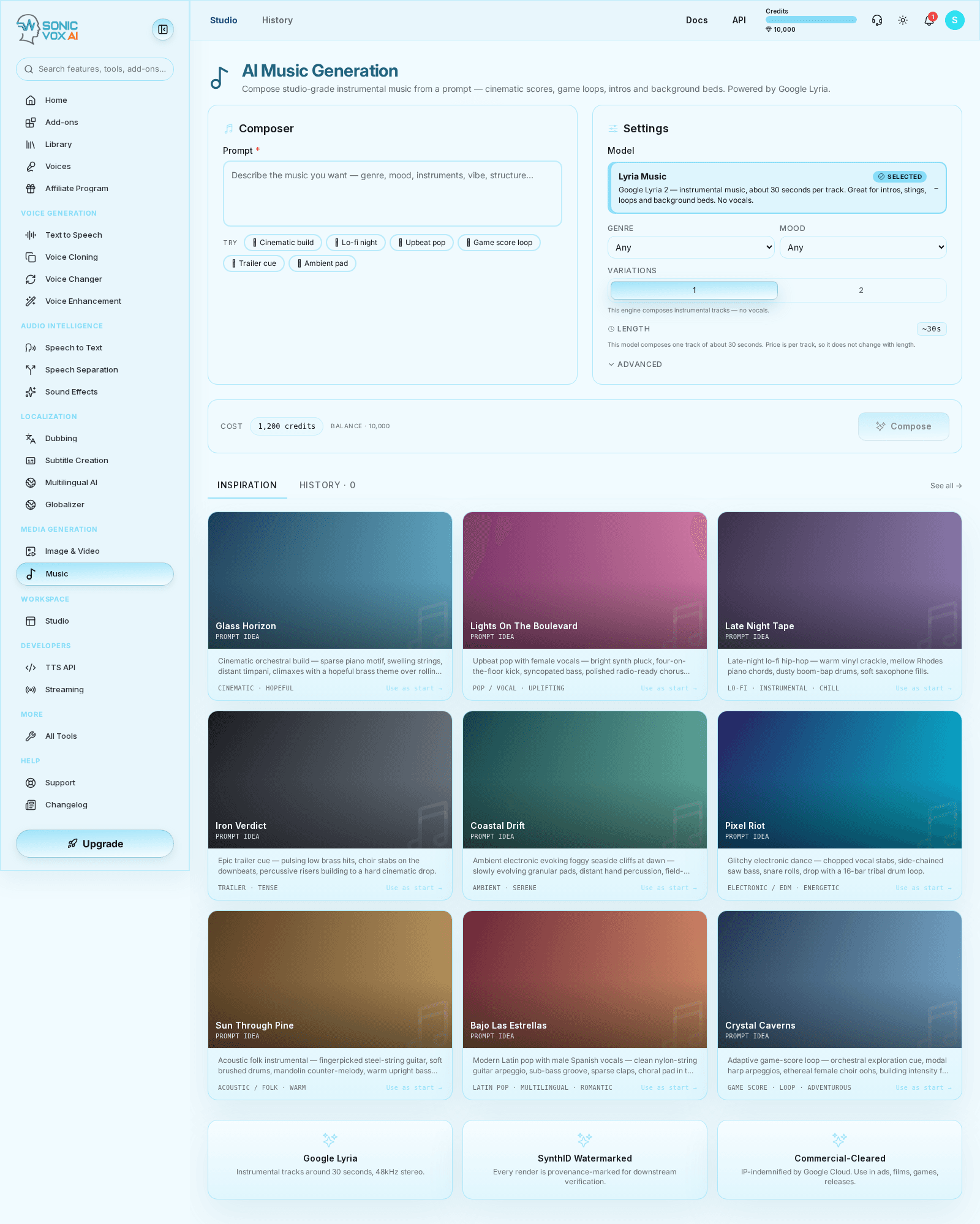
Music in SonicVox

Overview

Music Studio turns a prompt (genre, mood, instruments, tempo) into a finished 48 kHz stereo track. Nothing is uploaded: the engine composes from the brief, and the track lands in Music History alongside every earlier take.

Quickstart

Write the brief the way you would brief a composer, narrow it with the Genre and Mood selectors, then check the Cost chip before Compose. Music is billed per track rather than per second, because the engine picks its own length.

1

Write the brief

Describe genre, instruments, tempo, production style and what the music sits under. Starter prompts are there to edit rather than start from a blank box.

2

Narrow it with Genre and Mood

Both selectors default to Any; setting them steers the composition without rewriting the prompt.

3

Pick how many variations

One or two takes from the same brief. Each take is billed separately, so the Cost chip doubles with the second.

4

Compose and review in History

Check the Cost chip, press Compose, and play the finished track back from Music History.

Who this is for

Ideal users

  • Video, podcast and shorts teams needing an original bed instead of a licensed library track
  • Game and product teams scoring loops, stings and interface moments
  • Studio users who want music, narration and SFX from one workspace

Before you start

  • A brief that names instruments, tempo and the role the music plays in the mix
  • Enough credits for the track — the Cost chip quotes it before you commit

Settings

SettingDescriptionValues
PromptThe written brief. The single biggest lever on the result — name instruments, tempo and role in the mix.
ModelThe composition engine. Every other control on the panel is gated on what the selected engine can actually honour, so an instrumental-only engine shows no vocals, lyrics or reference-image controls at all.
Genre / MoodOptional direction selectors, both defaulting to Any.
VariationsOne or two takes per request. Billed per take.
LengthRead-only when the engine chooses its own length — roughly 30 seconds per track today. There is no slider in that case because it would change the price without changing the output.

Use cases

Background bed under narration

Score an explainer or podcast segment with a sparse arrangement that never competes with the voice track.

Intro, outro and logo stings

Produce a short branded motif for the top and tail of every episode or video without re-licensing a library cue.

Game and interface loops

Generate ambience and menu loops that match a project's mood, then layer them in Studio with the SFX set.

Examples

Lo-fi study bed

A loopable background bed that stays behind speech.

Warm lo-fi hip-hop bed — dusty vinyl crackle, mellow Rhodes chords, soft brushed drums, relaxed 78 BPM.

Trailer sting

A short cinematic hit for a logo animation.

Orchestral trailer sting — low brass swell, taiko hits, rising strings, one big impact on the last beat.

Best practices

  • Brief the arrangement, not just the genre: instruments, tempo, production style and what the music sits under.
  • Ask for "sparse" or "background bed, no lead melody" whenever the track has to live under narration.
  • Compose two variations of a tight brief rather than one take of a broad one.

Troubleshooting

I asked for vocals and got an instrumental

Likely cause

The engine on offer is instrumental-only, so the vocals, lyrics and vocal-language controls are hidden and vocal parameters are never sent to it.

What to do

Generate the sung or spoken layer with Text-to-Speech and mix it over the track in Studio.

The Compose button is disabled

Likely cause

The prompt is empty, or the quoted cost exceeds the balance — the Cost chip turns red and reads "insufficient".

What to do

Add a prompt, then top up or upgrade if the chip is still red.

The track is generic

Likely cause

The brief named a category but not instruments, tempo, or the role the music plays.

What to do

Rewrite it as a short production brief. Two focused variations beat one very broad prompt.

FAQs

Why is there no duration slider?

The engine picks its own length (about 30 seconds) and ignores a requested duration, so music is billed per track. A slider would let you change the price without changing the output.

How much does a track cost?

The Cost chip beside the Compose button quotes the exact figure for the selected engine before you commit, and that quote is what is charged. The price lives on the model row, so the studio always reads the live value.

Is generated music watermarked?

Yes — generated music carries a SynthID provenance watermark, which is inaudible and survives normal encoding.

Detailed guide

Long-form notes, richer formatting, and implementation context for teams that need more than the quickstart.

Deep dive
Rich formatted reference
Use this section for implementation nuance, workflow depth, and operational guidance that does not fit in a simple checklist.

Music Generation Guide

Compose original instrumental music from a text prompt.

What is Music Generation?

SonicVox Music Studio turns a written brief — genre, mood, instruments, vibe — into a finished stereo track (48 kHz) you can drop under a video, a podcast intro, a game loop, or a background bed. The engine composes; you never upload source audio.

The music engine is instrumental only. It does not sing, so the studio deliberately hides the vocals, lyrics and vocal-language controls when that engine is selected — a control the model would ignore is worse than a missing one, because you would pick it, pay, and get something else.

How to Compose a Track

Step 1: Open Music Studio

Navigate to Music in the sidebar (/app/music).

Step 2: Write the prompt

Describe the music as you would brief a composer:

  • ✅ Good: "Warm lo-fi hip-hop bed — dusty vinyl crackle, mellow Rhodes chords, soft brushed drums, relaxed 78 BPM"
  • ❌ Vague: "Chill music"

Starter prompts sit under the box if you want a working example to edit rather than a blank page.

Step 3: Set genre and mood (optional)

Two dropdowns narrow the direction without rewriting the prompt. Both default to Any.

  • Genre — Cinematic, Pop, Lo-fi, Trailer, Ambient, Electronic, EDM, Acoustic, Folk,

Rock, Hip-hop, R&B, Jazz, Classical, Orchestral, Game Score, Latin, Reggae, Country, World

  • Mood — Hopeful, Triumphant, Uplifting, Energetic, Romantic, Chill, Serene, Tense,

Dramatic, Mysterious, Warm, Adventurous, Melancholic, Playful, Dark

Step 4: Choose how many variations

Variations composes 1 or 2 takes from the same brief. Each take is billed separately.

Step 5: Compose

Check the Cost chip, then click Compose. The track is queued and the view switches to History.

Step 6: Play it back

Finished tracks appear under History (/app/music/history) with an inline player, the prompt, the genre and mood you chose, and the duration. Use the player's own menu to save the file locally.

Writing Effective Prompts

Name the instruments

  • "Solo cello over sparse piano, close-mic'd, a lot of room"
  • "Analog synth arpeggio, sub bass, gated reverb snare"

Say what it sits under

  • "Background bed for a product demo — never pulls focus from narration"
  • "Trailer sting for a 6-second logo animation, big hit on the last beat"

Give tempo and energy

  • "Slow build from sparse to full orchestra over 30 seconds"
  • "Driving 128 BPM four-on-the-floor, no vocals, radio-ready polish"

Describe the space

  • "Recorded in a small wooden church, natural reverb tail"
  • "Tight, dry, modern pop production"

Limits

Music generation
LengthThe model picks its own length — about 30 seconds per track
VocalsNot supported (instrumental only)
VariationsUp to 2 per request
Output48 kHz stereo audio
Reference imagesNot supported

Because the model chooses the length, there is no duration slider — only a note telling you what to expect. A slider there would let you change the price without changing the output.

Credits

Music is billed per track, not per second: the engine returns a fixed-length clip and the provider bills per clip, so a duration you cannot change must not move the price. Two variations cost twice one.

The exact figure for the model you have selected is shown in the Cost chip next to the Compose button before you confirm, and that quote is what gets charged — the price lives on the model row, so the studio always reads the live value rather than a number copied into a guide.

Troubleshooting

ProblemWhyFix
"I asked for vocals and got an instrumental"The offered engine is instrumental-only, so the vocals, lyrics and vocal-language controls are hidden and vocal parameters are never sent.Use Text-to-Speech for a sung or spoken layer and mix it over the track in Studio.
Compose button is disabledThe prompt is empty, or the cost exceeds your balance.Add a prompt, or top up / upgrade — the chip turns red and reads "insufficient" when the balance is short.
The track is genericThe prompt named a category but not instruments, tempo, or role in the mix.Rewrite it as a short production brief. Two focused variations beat one very broad prompt.
The track fights the narrationThe brief asked for a full arrangement where a bed was needed.Ask for "sparse", "background bed", "no lead melody", then duck it under speech in Studio.
Nothing playable in HistoryThe job is still running, or it failed.The History row shows the job status; a failed job is refunded, so check your balance rather than re-composing blind.

Provenance and Rights

Generated music carries a SynthID provenance watermark — an inaudible marker that survives normal encoding. Your use of generated tracks is governed by the SonicVox Terms of Service.

Related

  • Sound Effects — short, one-shot effects rather than musical beds
  • Studio Editor — layer the track under narration and SFX on a timeline
  • Text-to-Speech — the narration that usually sits on top
Was this page helpful?
Music | SonicVox Docs | SonicVox Docs