Voice Changer
Convert one voice into another style or target identity using the speech-to-speech workflow.
900 credits per conversion
- FLAT per conversion — a 5-second clip and a 5-minute recording cost the same.
- Batch your material into one longer file rather than many short ones.
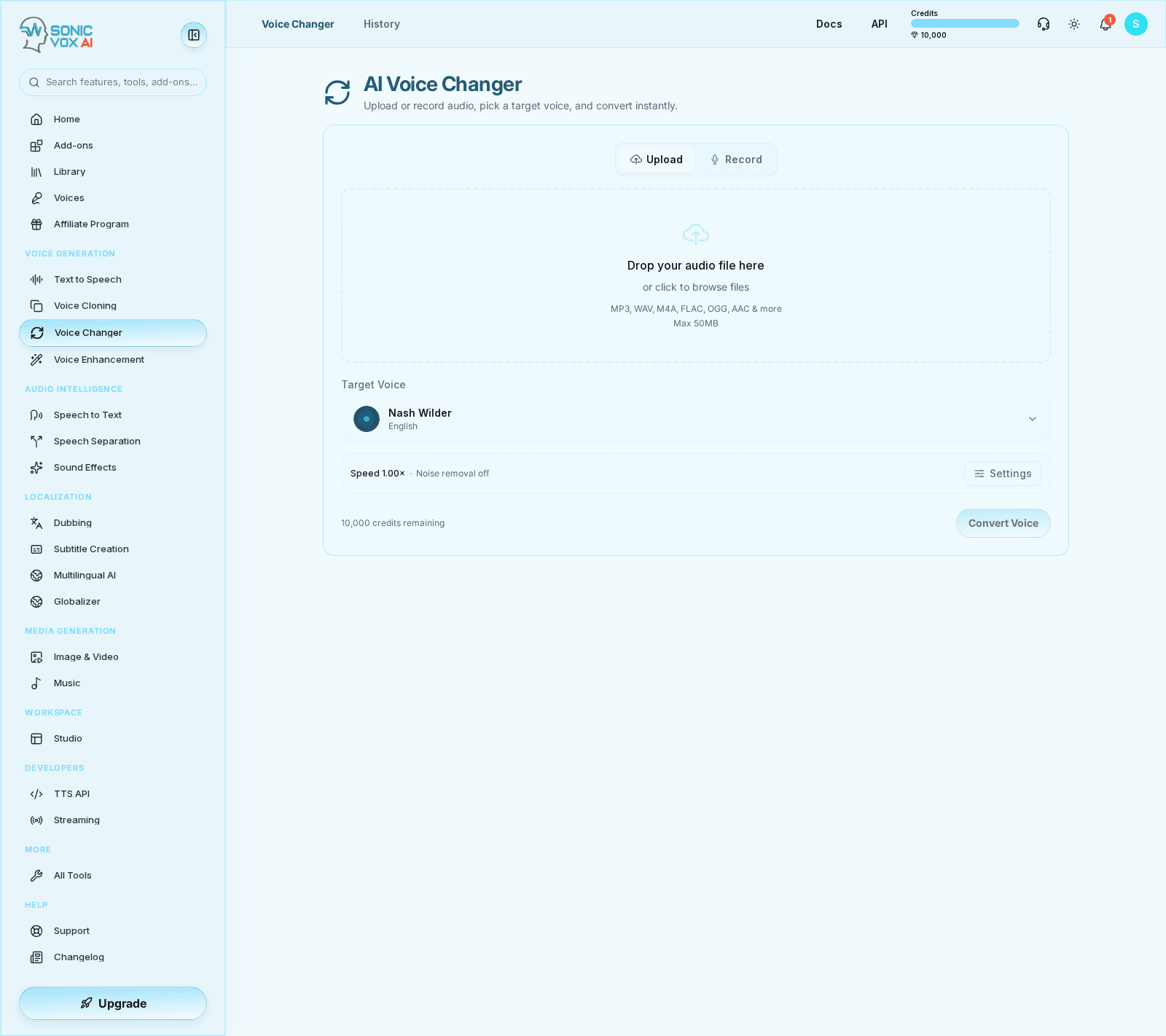
What it looks like
Listen
Every clip below is the same sentence, generated by SonicVox — so what changes between them is the voice, not the writing.
“SonicVox turns your script into natural speech — with the pacing, emphasis, and character you would expect from a studio recording.”
Emma Carter — English
A neutral English read, the kind most narration and product walkthroughs start from.
Marcus Grand — English
A deeper English delivery — the same sentence, so you are comparing voice rather than writing.
So-young Kim — Korean voice
A non-English voice reading the same line, to hear accent carry across the identical script.
Speech engines
Five engines, one API. Pick by what the job needs — the closest voice match, the widest language coverage, or the lowest latency.
Signature
DefaultMost natural — best voice match
Our flagship engine. The most natural-sounding speech with the closest match to your selected voice. Best for narration, ads, and any premium read in 10 major languages.
- Languages
- 10
- Cloned voices
- Yes
- Streaming
- No
en, zh, ja, ko, de, fr, ru, pt, es, it
Studio
Ultra-realistic, expressive
Our newest studio-grade engine — ultra-realistic clones with an expressiveness dial, in 23 languages. Great when you want maximum realism and a touch of drama.
- Languages
- 23
- Cloned voices
- Yes
- Streaming
- No
ar, da, de, el, en, es, fi, fr, he, hi, it, ja, ko, ms, nl, no, pl, pt, ru, sv, sw, tr, zh
Expressive
Lively, dynamic delivery
An expressive engine with naturally dynamic intonation and pacing — a characterful alternative to Signature for narration and dramatic reads. Multilingual.
- Languages
- 16
- Cloned voices
- Yes
- Streaming
- No
- Emotion
- Yes
de, el, en, es, fi, fr, hu, it, ja, ko, nl, pl, pt, ru, tr, zh
Multilingual
30+ languages, incl. Urdu, Hindi, Arabic
The broadest language coverage — 30+ languages and dialects, including ones the other engines can't speak. Renders a designed voice from its written description rather than from a recording, so it can't reproduce a cloned voice. Best for global content.
- Languages
- 30+
- Cloned voices
- From a description
- Streaming
- No
Classic
Fast streaming clone
A fast, lightweight clone engine with low-latency streaming. Mirrors your reference's pacing. Best for quick drafts and real-time use.
- Languages
- 5
- Cloned voices
- Yes
- Streaming
- Yes
en, zh, ja, ko, yue
Key facts
- Streaming: Classic only
- The low-latency endpoints are backed by one engine; the others render a whole take before returning.
- Cloned voices: 4 of 5 engines
- An engine that renders from a written description cannot reproduce a recording-based clone.
Overview
Voice Changer is the speech-to-speech workflow for taking an input recording and transforming it toward a target voice or style. It is useful when you already have speech timing and performance but need a different speaker identity.
Quickstart
Upload the source audio
Start with a clean spoken clip that already contains the timing and inflection you want to preserve.
Choose the target voice
Pick the transformation target before running the conversion.
Generate the converted take
Process the clip, then compare the source and converted versions for tone and intelligibility.
Save or export
Keep successful takes in history for reuse in Studio or delivery workflows.
Settings
| Setting | Description | Values |
|---|---|---|
| Source audio | Defines the timing, rhythm, and phrasing that the converted clip will follow. | — |
| Target voice | Controls the identity or style used for the converted output. | — |
Best practices
- Trim silence from the source before conversion.
- Start with shorter clips to validate quality before batch processing longer recordings.
- Keep the target voice list curated so teams do not accidentally use experimental voices in production.
FAQs
Is the transformation actually real-time?
No — conversion runs as a job, not a live stream. You give the changer a finished clip (upload or record), it converts, and the take lands in your history. Longer source audio takes longer to come back. There is no live-monitoring or sub-second path today; Streaming covers text-to-speech only.
Can I use my own voice as the source?
Yes. Record straight into the browser with your laptop or USB mic, or upload a file you captured elsewhere. Recording stops first, then the changer converts the take — it does not transform your voice as you speak.
Will I sound exactly like a target person?
The voice changer modifies characteristics (pitch, tone, timbre, accent), but it's not designed to impersonate a specific person. For one-to-one identity matching, use Voice Cloning instead.
What input formats are supported?
Uploaded files — MP3, WAV, FLAC, OGG, M4A and most other common audio formats. You can also record straight from your microphone in the browser; the recorder captures the take and hands it to the same upload path. Conversion is file-based and asynchronous, so there is no streaming or WebSocket input.
Does it work with OBS, Discord, or my DAW?
Not as a live input. SonicVox has no virtual audio device or desktop driver — the Voice Changer renders a finished file. Convert your clip, download it, then drop it into OBS, a Discord soundboard, or your DAW like any other audio asset.
What about privacy and consent?
Your audio is never used for training without explicit, written consent. Encrypted in transit and at rest, with configurable retention. Enterprise customers can deploy on-prem.
Can I save my own presets?
Not as saved presets — there is nothing to tune beyond speed. The Voice Changer has one adjustable setting, Conversion Speed, plus an optional Remove Background Noise toggle, both under Advanced settings. What you reuse between projects is the target voice: pick any voice from your library, including ones you have cloned or designed.
Is there a free tier?
Yes — 10,000 free characters per month plus voice changer access included. No credit card required.