DocsCore Features

Text to Speech

Turn scripts into spoken audio with selectable voices, generation history, and reusable outputs.

What you get
WAV download • History entry • Reusable asset in your workspace
What it costs

100 credits per 100 characters, rounded upA 500-word script (~2,800 characters) costs about 2,800 credits.

  • Effectively 1 credit per character.
  • A single request is capped at 50,000 characters.
  • POST /api/v1/text-to-speech/estimate prices any string for free, without synthesizing it.

What it looks like

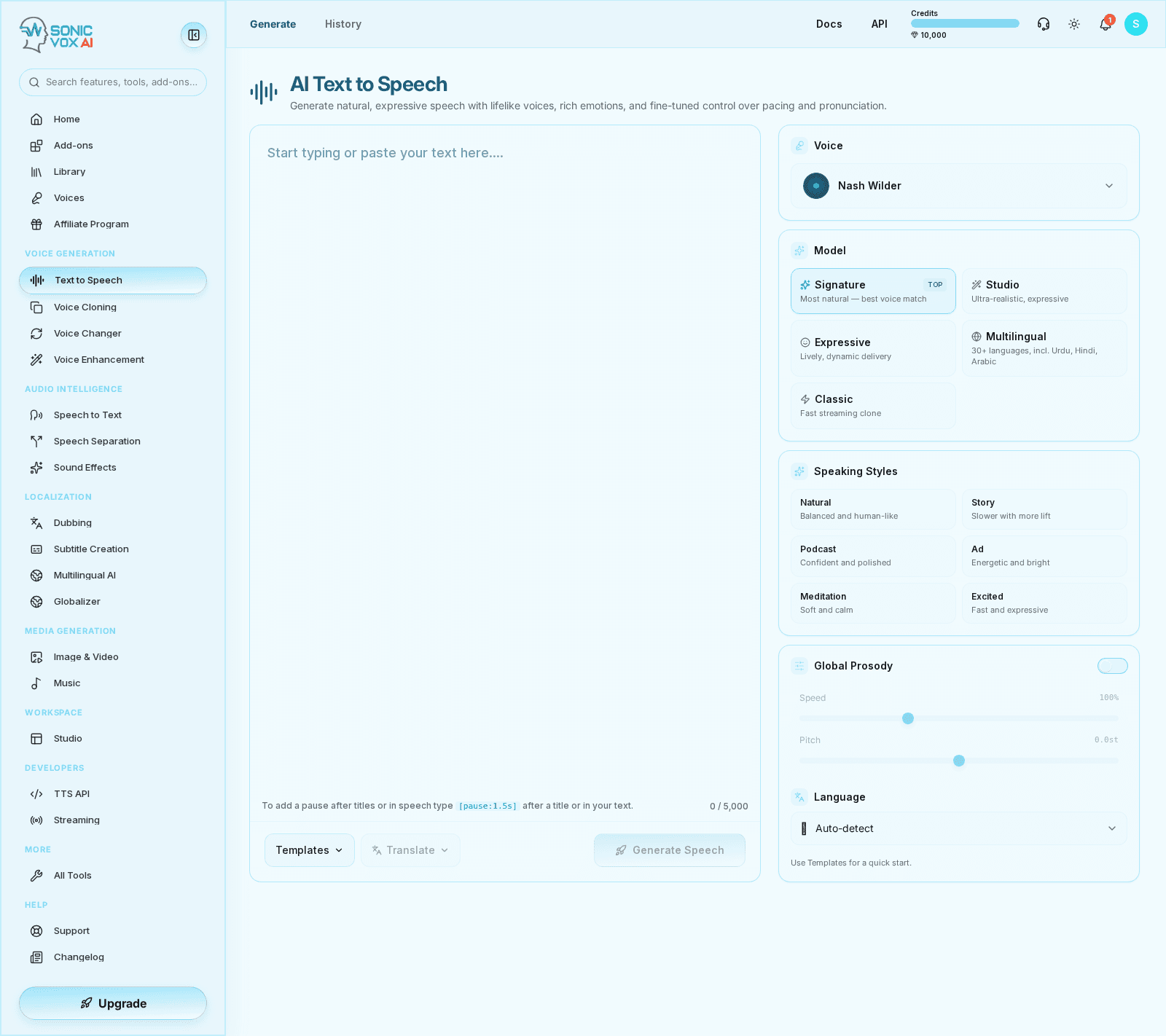
Text to Speech in SonicVox

Listen

Every clip below is the same sentence, generated by SonicVox — so what changes between them is the voice, not the writing.

SonicVox turns your script into natural speech — with the pacing, emphasis, and character you would expect from a studio recording.
  • Emma Carter — English

    A neutral English read, the kind most narration and product walkthroughs start from.

  • Marcus Grand — English

    A deeper English delivery — the same sentence, so you are comparing voice rather than writing.

  • So-young Kim — Korean voice

    A non-English voice reading the same line, to hear accent carry across the identical script.

Speech engines

Five engines, one API. Pick by what the job needs — the closest voice match, the widest language coverage, or the lowest latency.

Signature

Default

Most natural — best voice match

Our flagship engine. The most natural-sounding speech with the closest match to your selected voice. Best for narration, ads, and any premium read in 10 major languages.

Languages
10
Cloned voices
Yes
Streaming
No

en, zh, ja, ko, de, fr, ru, pt, es, it

Studio

Ultra-realistic, expressive

Our newest studio-grade engine — ultra-realistic clones with an expressiveness dial, in 23 languages. Great when you want maximum realism and a touch of drama.

Languages
23
Cloned voices
Yes
Streaming
No

ar, da, de, el, en, es, fi, fr, he, hi, it, ja, ko, ms, nl, no, pl, pt, ru, sv, sw, tr, zh

Expressive

Lively, dynamic delivery

An expressive engine with naturally dynamic intonation and pacing — a characterful alternative to Signature for narration and dramatic reads. Multilingual.

Languages
16
Cloned voices
Yes
Streaming
No
Emotion
Yes

de, el, en, es, fi, fr, hu, it, ja, ko, nl, pl, pt, ru, tr, zh

Multilingual

30+ languages, incl. Urdu, Hindi, Arabic

The broadest language coverage — 30+ languages and dialects, including ones the other engines can't speak. Renders a designed voice from its written description rather than from a recording, so it can't reproduce a cloned voice. Best for global content.

Languages
30+
Cloned voices
From a description
Streaming
No

Classic

Fast streaming clone

A fast, lightweight clone engine with low-latency streaming. Mirrors your reference's pacing. Best for quick drafts and real-time use.

Languages
5
Cloned voices
Yes
Streaming
Yes

en, zh, ja, ko, yue

Key facts

Cost: 100 credits per 100 characters
Rounded up, so a 250-character line costs three blocks, not two and a half.
Request limit: 50,000 characters per request
Longer scripts are split — Studio does this for you.
Streaming: Classic only
The low-latency endpoints are backed by one engine; the others render a whole take before returning.
Cloned voices: 4 of 5 engines
An engine that renders from a written description cannot reproduce a recording-based clone.

Overview

Text to Speech is the fastest path from script to voice output in SonicVox. Use it for narration, product demos, audiobooks, prototypes, and any workflow where the text is already known.

Quickstart

1

Open the generator

Go to Text to Speech and start from the Generate tab.

2

Enter or paste your script

Use punctuation, paragraphing, and deliberate phrasing to improve rhythm and pronunciation.

3

Choose a voice

Select a built-in voice or one of your cloned voices before starting generation.

4

Generate and review

Listen to the result, regenerate if needed, then download it or send it into another workflow.

Who this is for

Ideal users

  • Marketing and content teams producing narration quickly
  • Founders and PMs prototyping voice UX without engineering work
  • Operations teams generating repeatable spoken notices or scripts

Before you start

  • A finalized or near-final script
  • A selected built-in or cloned voice for the first test run
  • Enough credits for at least two or three revisions of the same passage

Settings

SettingDescriptionValues
VoiceControls who speaks the script and the tone profile of the result.
Script formattingParagraph breaks and punctuation influence pacing and pause behavior.
HistoryLets you revisit prior generations without re-entering the same script.

Use cases

Narrated product walkthroughs

Turn polished launch messaging or onboarding copy into spoken audio for demos, docs, and landing pages.

Operational announcements

Generate concise, repeatable voice clips for alerts, wait-room messaging, status updates, and internal tooling.

Draft voiceovers before full post-production

Create rough or final voice takes before layering SFX, intro music, and transitions in Studio.

Examples

Narration

Generate a product explainer or onboarding script in a clear voice.

Welcome to SonicVox. In this quick tour, we will show you how to generate speech, clone voices, and assemble projects in Studio.

Announcement

Use short, high-clarity text for alerts or IVR-style messages.

Your custom export is ready. Please check your history page to download the WAV file.

Best practices

  • Break long scripts into sections so you can regenerate only the parts that need polish.
  • Use cloned voices only after the base script is stable to reduce unnecessary iterations.
  • Send approved clips into Studio for sequencing instead of rebuilding the same assets repeatedly.

Troubleshooting

Pronunciation sounds wrong

Likely cause

Short acronyms, brand terms, names, and compact punctuation can make the model guess incorrectly.

What to do

Rewrite tricky words phonetically, add punctuation to guide pacing, and test a short excerpt before generating the full script.

The delivery sounds too flat or too rushed

Likely cause

Long dense paragraphs with little punctuation reduce the model's ability to create natural timing.

What to do

Break scripts into smaller blocks, add deliberate sentence structure, and regenerate only the section that needs a better rhythm.

I keep regenerating the whole script for tiny fixes

Likely cause

Long single-pass scripts make small edits expensive in both time and credits.

What to do

Split the script into reusable sections and move approved clips into Studio instead of treating the whole project as one monolithic generation.

FAQs

Should I start with a cloned voice or a built-in voice?

Start with a built-in voice while the script is still changing. Switch to a cloned voice when the copy and structure are stable enough to justify final-quality passes.

How do I turn one TTS output into a full production?

Approve the speech first, then open Studio to sequence clips, add sound effects, import extra audio, and export the mixed result.

How natural do the voices sound?

Cinematic, broadcast-grade. Most listeners can't distinguish a SonicVox take from a recorded studio session. Browse the voice library to hear samples — and clone your own voice if you want a one-to-one match.

Which languages are supported?

30+ languages including English, Spanish, Mandarin, Japanese, Hindi, Arabic, French, German, Portuguese, Korean, Italian, Turkish, Russian, and more — with extensive Chinese dialect coverage. The real-time streaming endpoint is the one exception: it runs a single low-latency engine covering English, Mandarin, Japanese, Korean, and Cantonese, so everything else renders on the standard (buffered) API.

Can I clone my own voice?

Yes. Upload about 10 seconds of clean audio of your voice, and SonicVox creates a multilingual clone you can use commercially. The clone preserves your tone and identity across every supported language.

What audio quality do you produce?

Up to 48 kHz, broadcast-grade. Render to MP3, WAV, or PCM. Streaming output starts in well under a second.

Do I own the audio I generate?

Yes. The audio is yours to use commercially under our standard terms. Voices you design or clone from your own consented recordings are yours as well.

Is there a free tier?

Yes — 10,000 free credits per month, no credit card required to start. Voice cloning and API access start on paid plans.

Can I integrate via API?

Yes. REST and streaming endpoints, webhooks, and batch processing — plain HTTP with an API key, so any language works. Official SDKs ship for Node and Python. First byte arrives in well under a second.

Is my text used to train models?

No. Customer text and audio are never used for training without explicit, written consent. Everything is encrypted in transit and at rest, with configurable retention.

Detailed guide

Long-form notes, richer formatting, and implementation context for teams that need more than the quickstart.

Deep dive
Rich formatted reference
Use this section for implementation nuance, workflow depth, and operational guidance that does not fit in a simple checklist.

Text-to-Speech Guide

Generate natural-sounding speech from text using SonicVox's AI voices.

Quick Start

  1. Navigate to Text-to-Speech in the sidebar
  2. Enter your text in the editor
  3. Select a voice from the dropdown
  4. Click Generate Speech
  5. Download or preview your audio

Voice Selection

Built-in Voices

SonicVox includes professional pre-trained voices. The studio's language picker offers Auto-detect plus 24 languages:

  • English, Chinese, Cantonese, Spanish, French, German, Italian, Portuguese, Russian
  • Japanese, Korean, Urdu, Hindi, Arabic, Dutch, Polish, Turkish
  • Greek, Hungarian, Finnish, Swedish, Danish, Indonesian, Vietnamese

There are also Force All variants for Chinese, Japanese, Korean, and Cantonese, for text that mixes scripts.

Coverage is per engine, not global, and the studio routes your request to an engine that speaks the language you picked: Multilingual covers 30+ languages, Studio 23, Expressive 16, Signature 10, and Classic 5 (English, Chinese, Japanese, Korean, Cantonese).

Cloned Voices

Use your own cloned voices for personalized output. See the Voice Cloning Guide.

Text Formatting

Paragraphs

One request produces one audio clip — paragraphs are not split into separate files. Line breaks and punctuation still shape pacing within that clip.

Pauses

SSML authoring was removed from the studio, so <break> and <emphasis> tags are not the way to control delivery. Type a pause token directly into your text instead:

  • [pause:1.5s] - pause for 1.5 seconds
  • [pause:500ms] - pause in milliseconds
  • [pause], [short pause], [long pause] - shorthand

Pause lengths are clamped to 50ms - 10s.

Settings

Speed and Pitch live in the Global Prosody panel, behind a toggle that is off by default — leave it off and your audio renders at 1.0x and 0 semitones no matter where the sliders sit.

SettingDescriptionRange
SpeedSynthesis rate — how fast the voice actually speaks, baked into the generated audio (not a playback control)50% - 200% (0.5x - 2x)
PitchPitch shift in semitones-12st to +12st

There is no Volume control on the Text-to-Speech page. The API exposes a volume gain multiplier (0 - 2) if you need one.

Best Practices

  1. Keep paragraphs short - 2-3 sentences each for natural flow
  2. Use punctuation - Commas and periods affect pacing
  3. Preview before downloading - Check pronunciation
  4. Spell out numbers - "twenty-three" vs "23" for clarity

Output Formats

In the app, Download is available immediately after generation and gives you an MP3.

Over the API, output_format selects the container/codec:

  • mp3
  • wav - the default when you omit the field
  • pcm_16000
  • pcm_24000
  • opus

API Access

For programmatic access, use the TTS API. Full verified request/response examples live at the Text to Speech API reference.

POST /api/v1/text-to-speech
sv-api-key: YOUR_API_KEY
Content-Type: application/json

{
  "text": "Hello world",
  "voice_id": "your_voice_id",
  "output_format": "mp3"
}

The sv-api-key header is required (x-api-key and Authorization: Bearer are accepted too). Omit voice_id to fall back to your account default voice.

Was this page helpful?
Text to Speech | SonicVox Docs | SonicVox Docs